A credit card payoff calculator can show your estimated debt-free date, total interest, and how much faster you may pay off debt when you add extra monthly payments. This guide explains exactly how to use one without guessing.

Introduction: why a payoff calculator matters
Credit card debt becomes stressful when the numbers feel invisible. You may know the current balance, but not the real cost of carrying that balance month after month. A credit card payoff calculator helps turn that uncertainty into a clearer plan by estimating how long it may take to pay off the balance, how much interest you may pay, and how extra payments could change the timeline.
The goal is not to shame your past spending or force an unrealistic plan. The goal is to see your options. Once you enter your balance, APR, monthly payment, and possible extra payment, you can compare different repayment scenarios and choose a plan that fits your budget.
Moniply is designed around this type of simple money clarity. Instead of guessing whether an extra $50, $100, or $200 matters, you can test the numbers before you commit. That makes your debt payoff plan calmer, more realistic, and easier to repeat.
What is a credit card payoff calculator?
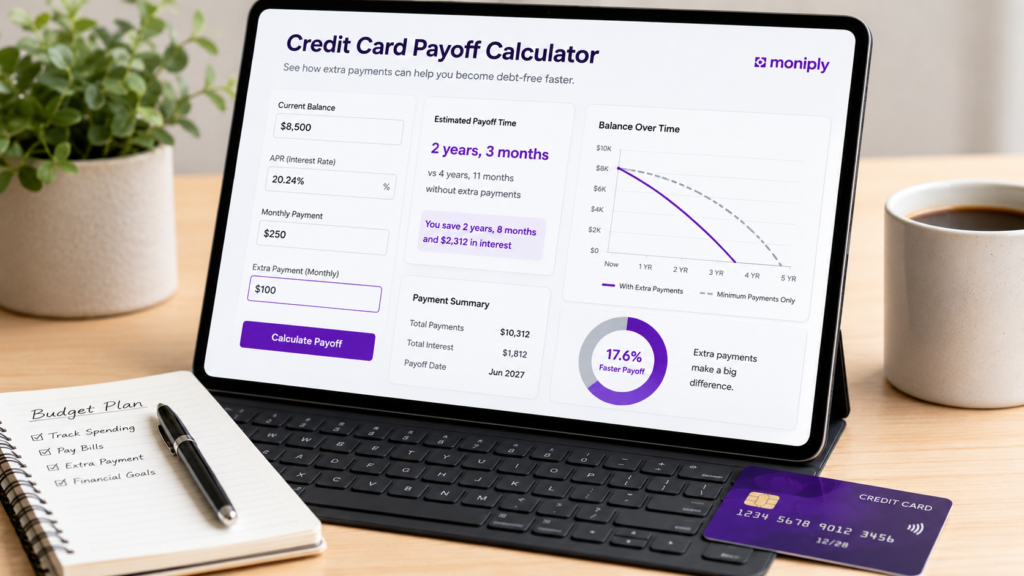
A credit card payoff calculator is a planning tool that estimates how long it may take to pay off a credit card balance based on your balance, interest rate, and monthly payment. A good calculator also lets you test extra payments so you can compare the difference between your current plan and a stronger payoff plan.
For example, if you owe $8,500 on a card with a 20.24% APR and you pay $250 per month, the payoff may take much longer than you expect. If you add an extra $100 per month, the same balance may be paid down significantly faster. The calculator makes that comparison visible.
A calculator is not a guarantee. Your actual result can change if your APR changes, you miss payments, add new purchases, receive fees, or have promotional balances with special terms. However, it is still one of the best first steps for building a practical payoff plan.
The four numbers you need before you calculate
Before opening a calculator, collect four numbers from your latest credit card statement or online account. First, find your current balance. This is the amount you currently owe, but remember that a final payoff amount may include interest through the payment date.
Second, find your APR. The APR is the annual percentage rate used to calculate interest. Some cards have different APRs for purchases, cash advances, balance transfers, or promotional balances, so use the rate that applies to the balance you are planning to pay off.
Third, find your current monthly payment. This may be your minimum payment or the amount you usually pay. Fourth, decide whether you can add an extra monthly payment amount. Even a small extra payment can reduce the timeline if you repeat it consistently.
Step-by-step: how to use a credit card payoff calculator
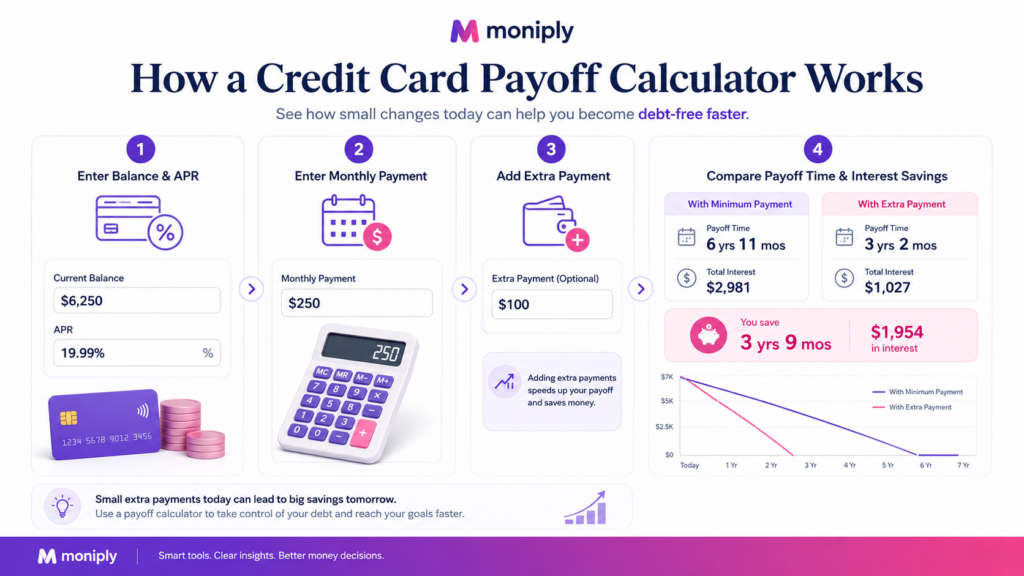
Step 1: Enter your current credit card balance. Use the latest statement balance or current account balance. If you recently made purchases, decide whether to include them in the payoff plan.
Step 2: Enter the APR. Use the APR that applies to the balance. If your card has multiple APRs, start with the main purchase APR and then check your statement for any special balances.
Step 3: Enter your monthly payment. This is the amount you plan to pay every month. If you can pay more than the minimum, enter the realistic amount you can repeat without damaging your essential budget.
Step 4: Add a test extra payment. Try $50, $100, or another amount. The point is to see how much the payoff date and interest cost change when you add more money each month.
Step 5: Compare the results. Look at the estimated payoff time, total interest, and debt-free date. Then choose the plan that is aggressive enough to help but realistic enough to continue.
Example: minimum-style payment vs extra payment
Here is a simple learning example using USD. Starting balance: $8,500. APR: 20.24%. Current monthly payment: $250. Extra payment test: $100 per month, making the total payment $350.
At $250 per month, the estimated payoff time is about 51 months, or about 4 years and 3 months. Estimated interest is about $4,236. At $350 per month, the estimated payoff time is about 32 months, or about 2 years and 8 months. Estimated interest is about $2,528.
In this example, adding $100 per month may save about 19 months and about $1,708 in interest. The exact result will vary by issuer rules, billing dates, APR, fees, and whether new purchases are added. But the lesson is clear: small repeated extra payments can make the payoff path easier to understand and often much faster.
How to read the calculator results
The first result to read is the payoff time. This shows the estimated number of months until the balance reaches zero if you follow the payment plan. The second result is the debt-free date, which turns the month count into a calendar milestone.
The third result is total interest. This matters because interest is the hidden cost of carrying the balance. If two payment plans both pay off the card eventually, the better plan is usually the one that reduces unnecessary interest while still protecting your monthly budget.
The fourth result is the comparison between payment scenarios. This is where a calculator becomes powerful. You can test your current payment, then add $50, $100, or $200 extra and compare the difference before changing your real-life payments.
Why minimum payments can keep debt around longer

Minimum payments are designed to keep the account current, not necessarily to help you become debt-free quickly. The CFPB explains that minimum-payment education should help people understand how credit card companies calculate minimum payments and how paying more than the minimum affects payoff time.
If you only make the minimum payment, part of your payment may go toward interest, and the remaining amount may reduce the balance slowly. This is why a balance can feel stuck even when you are paying every month.
That does not mean minimum payments are unimportant. Minimum payments help protect your account from late fees and delinquency. The key is to keep minimums current while using extra payments when your budget allows.
Where extra payments fit in your monthly budget
Extra payments should come from a planned surplus, not from money needed for rent, food, utilities, transportation, insurance, or essential bills. Before adding extra debt payments, review your monthly budget and make sure you are not creating a new shortfall.
A practical approach is to choose one monthly extra-payment target. For example, you might decide to add $50 every month for three months, then review. If your income increases or expenses decrease, you can raise the extra amount later.
Use Moniply’s Budget Calculator or Budget Dashboard to check whether the extra payment fits your real cash flow. A payoff plan is only strong if it is repeatable.
When to use snowball, avalanche, or custom payoff order
If you have only one credit card, the payoff calculator is straightforward. If you have multiple cards, you also need a payoff order. The debt avalanche method targets the highest APR first. This may reduce interest cost. The debt snowball method targets the smallest balance first. This may create motivation and quick wins.
A custom order may also make sense. For example, you may prioritize an account that is past due, emotionally stressful, or close to its credit limit. The right order depends on both the math and your ability to stay consistent.
For multiple accounts, use Moniply’s Debt Payoff Calculator, Debt Snowball Calculator, or Debt Avalanche Calculator after using the credit card payoff calculator for the individual card.
Common mistakes to avoid
Mistake 1: guessing your APR. If the APR is wrong, the payoff estimate will be wrong. Always check your latest statement.
Mistake 2: using only the minimum payment without comparing alternatives. Minimum payments keep the account current but can stretch payoff time. Test extra payments to see the difference.
Mistake 3: forgetting new purchases. If you keep adding purchases to the same card, your payoff date may move further away. Consider pausing new charges while following a payoff plan.
Mistake 4: ignoring fees, promotional balances, or cash advances. Different balances may have different APRs or rules. Read your statement carefully.
Mistake 5: trusting debt relief promises without checking risks. The FTC warns consumers to be careful with companies promising to reduce credit card debt or lower interest rates for a fee. Be especially cautious if a company tells you to stop making minimum payments.
What to do if you cannot afford the minimum payment
If you cannot afford even the minimum payment, the answer is not to pretend the problem is smaller. First, review your essential budget and decide how much you can afford. Then contact the credit card issuer and ask what hardship or payment options may be available.
The CFPB recommends watching out for debt settlement or debt relief companies, especially if they tell you to stop making minimum payments. Missing payments can lead to fees, credit damage, collection activity, and more stress.
If the situation is serious, consider speaking with a reputable nonprofit credit counselor. Avoid paying upfront fees to companies that make guaranteed promises.
How Moniply helps you turn the estimate into action
The calculator gives you the estimate, but your monthly system creates the result. After calculating, save three numbers: your target monthly payment, your estimated payoff date, and your next review date.
Then add the payment target into your budget. If the plan is too tight, lower the extra payment and continue. If the plan feels easy after a month or two, increase the extra amount. This keeps the plan flexible without losing direction.
Moniply’s goal is to help users move from scattered numbers to simple action: know what you owe, test your options, choose a payment target, and repeat the plan until the balance is gone.
FAQ
What is a credit card payoff calculator?
A credit card payoff calculator estimates how long it may take to pay off a credit card balance based on balance, APR, monthly payment, and optional extra payments.
Is a credit card payoff calculator accurate?
It is an estimate, not a guarantee. Actual results can change because of fees, APR changes, billing dates, missed payments, issuer rules, or new purchases.
What information do I need to use a payoff calculator?
You usually need your current balance, APR, monthly payment, and any extra monthly amount you want to test.
Does paying more than the minimum help?
Often, yes. Paying more than the minimum can reduce payoff time and interest cost, as long as the extra payment fits your budget.
Should I use snowball or avalanche for multiple credit cards?
Use avalanche if you want to prioritize higher APR balances. Use snowball if you need quick wins and motivation. For multiple debts, compare both with Moniply tools.
Should I stop using the card while paying it off?
Pausing new purchases can make the payoff plan more accurate because new charges may push the payoff date further away.
What if I cannot make the minimum payment?
Review your budget, contact your card issuer, ask about hardship options, and be careful with debt relief companies that make guaranteed promises or tell you to stop paying minimums.
Final takeaway
A credit card payoff calculator is not just a math tool. It is a clarity tool. It shows the cost of your current plan, the benefit of extra payments, and the timeline between today and your debt-free date.
Start with accurate numbers, protect your essential budget, keep minimum payments current, and test one extra-payment amount at a time. Small steps repeated every month can turn a confusing credit card balance into a clear payoff plan.
Use the Moniply Credit Card Payoff Calculator to run your numbers, then connect the result to your budget so your plan becomes practical, not just hopeful.
Ready to see your own debt-free date? Open the Moniply Credit Card Payoff Calculator and test your balance, APR, monthly payment, and extra-payment options.
8. Source and Compliance Notes
YMYL / finance compliance: This article is educational and should not promise guaranteed savings, guaranteed payoff dates, guaranteed credit score improvement, or guaranteed debt relief outcomes. Calculator outputs should be described as estimates.
- Use accurate language: estimate, may, could, compare, plan, review.
- Avoid overclaims: guaranteed debt freedom, instant credit repair, certain savings, debt elimination promises.
- Keep a clear disclaimer near the end of the article.
- For debt relief or settlement topics, warn readers to avoid upfront-fee scams and unrealistic promises.
- For credit card interest, remind readers that statements may include different APRs for different transaction categories.
Reference Links Used
- CFPB – Understanding minimum payments
- CFPB – Know Before You Owe: Credit cards
- CFPB – How credit card interest is calculated
- CFPB – What to do if you cannot pay your credit card bills
- FTC – How to get out of debt
- FTC – How to recognize scams to lower your credit card interest rate
Build your debt payoff plan
Compare payoff methods, check your monthly capacity, and turn this article into a step-by-step action plan.
Get the Moniply AI Finance Coach app
Moniply is building an Android app that turns budgeting, savings, debt payoff, and money decisions into simple AI-guided next steps.

Author: M.Adil
Finance professional and Moniply founder. Moniply helps everyday people use simple tools, practical guides, and AI-style money coaching to budget, save, and make calmer financial decisions.